
How to Run Sprint Planning Asynchronously
A practical guide to estimating and agreeing on a sprint's work without getting everyone into the same meeting at the same time - and to recognising when you still should.
Published October 12, 2026
What asynchronous sprint planning is
Sprint planning usually means one long meeting where the whole team reads tickets aloud, estimates them together, and argues about the handful that are unclear. Most of that time goes on tickets everyone already agrees about.
Asynchronous sprint planning splits the work in two. Each person reviews and estimates the backlog on their own schedule, within an agreed window. The team then spends shared time - if it needs any - only on the items where estimates disagreed or someone flagged a question. The outcome is the same as a planning meeting: a sized, agreed set of work. The difference is where the time goes.
When it works well
- Distributed teams and time zones. When there is no comfortable hour for everyone, a window of a day or two lets each person estimate during their own working hours.
- Teams that protect deep work. Estimating a ticket between focus blocks is cheaper than stopping everyone for a long meeting.
- Well-groomed backlogs. If tickets already have clear descriptions and acceptance criteria, most of them can be sized without discussion.
- Mixed-discipline teams. When frontend, backend, QA or platform people each size only part of the work, it is wasteful to have everyone sit through every ticket.
- Steady, repeatable work. Familiar kinds of tickets are where independent estimates converge most often.
When a live meeting is still the right call
Asynchronous planning is a tool, not a rule. Get people together when:
- Requirements are ambiguous. If the team cannot estimate because nobody knows what “done” means, a conversation will resolve it faster than a comment thread.
- Estimates are far apart. A 2 next to a 13 usually means two people understood different tickets. That is worth talking through, not averaging.
- A decision is urgent. If the sprint starts tomorrow, a one-to-two-day window does not fit.
- The work needs real-time design. New architecture, a cross-team dependency, or a risky migration benefits from people thinking out loud together.
In practice most teams end up with a hybrid: estimate asynchronously, then hold a short follow-up conversation covering only the tickets that did not settle.
A practical workflow
1. Prepare and clarify the backlog items
Asynchronous estimation punishes unclear tickets, because nobody is in the room to answer questions. Before the window opens, make sure each candidate ticket has a description and acceptance criteria, and split anything that is obviously too large. Decide which disciplines need to size each ticket - not every ticket needs a QA estimate or a backend estimate.
2. Set an estimation window and a deadline
Pick a start and an end, and say them explicitly - “estimates by Wednesday at noon” is far better than “when you get a chance”. Post the deadline wherever your team already talks, alongside the link to the session.
3. Ask team members to estimate independently
Each person reads the tickets relevant to them and gives an estimate without seeing anyone else’s. Independence is the point: it is what makes disagreement visible instead of letting the first number spoken anchor the rest.
Give people an honest way out. “I don’t understand this ticket” and “this isn’t mine to size” are both useful answers, and much better than a guess.
4. Review the estimates and find the outliers
Once the window closes, sort the tickets into three groups: the ones where everyone agreed, the ones where estimates differed, and the ones someone flagged with a question. The first group is done. The other two are your agenda.
5. Discuss only the stories that need it
Take the disagreements and questions to a short conversation - a call, a thread, or a few minutes at the end of stand-up. Ask the people at each end of the range to explain their reasoning; often one of them knows about a dependency the other doesn’t. Re-estimate or split as needed.
6. Record the agreed estimate and follow-up actions
Write the final estimate where your team tracks work, and capture anything the discussion uncovered: a ticket to split, a question for the product owner, a spike to schedule. Name an owner for each follow-up, or it will quietly disappear.
An example timeline
This is an illustration, not a prescription. Adjust the window to your team’s time zones and sprint length.
- Day 1, morning. The Scrum Master or product owner finalises the candidate tickets, opens the estimation session, and posts the link with the deadline: “Day 2, 12:00.”
- Day 1 to Day 2 morning. Team members estimate in their own time, answering “?” on anything unclear. The product owner keeps an eye on questions raised in the team channel.
- Day 2, 12:00. The window closes. Agreed tickets are already settled; the review list shows what is left.
- Day 2, afternoon. A 15–30 minute conversation with the people involved in the remaining tickets. Final values are recorded and follow-ups assigned.
- Sprint start. The team commits to the sprint using the agreed estimates.
Common failure modes
- Unclear acceptance criteria. Estimates scatter or everyone answers “?”. Fix it upstream: groom before the window opens.
- No deadline. The session drifts into the sprint itself. Always publish an end time.
- Silent disagreement. Someone picks the number they expect others to pick, to avoid a discussion. Make it clear that “?” and outliers are welcome — that is the information the process exists to surface.
- Oversized stories. Large tickets produce wide, low-confidence estimates. If a ticket keeps coming back with a big spread, split it.
- Nobody owns the follow-up. Disagreements get noted and never resolved. Assign one person to run the review and record the outcomes.
- Everyone estimates everything. Asking QA to size a pure backend change, or vice versa, adds noise and fatigue. Ask each discipline only about the work it does.
A team policy you can copy
Adapt this to your team and keep it somewhere everyone can find it.
Asynchronous estimation policy
- Candidate tickets are groomed, with acceptance criteria, before the window opens.
- Each ticket is tagged with the disciplines that need to size it.
- The estimation window is [1–2 working days]; the deadline is posted with the link.
- Estimate independently. Answer “?” if a ticket is unclear — don’t guess.
- Tickets everyone agrees on are final; they are not re-discussed.
- [Scrum Master] runs a short review of disagreements and questions after the deadline.
- Outcomes, final points and follow-ups are recorded in [JIRA] by [owner] the same day.
- If a ticket can’t settle asynchronously twice in a row, it gets a live discussion or a spike.
Running it in Async Pointing Poker
Async Pointing Poker is a free planning-poker tool built for exactly this workflow, for teams that track work in JIRA. Here is how each step maps onto it.
- Set up the session. Sign in with JIRA, then paste a list of ticket links or browse your JIRA projects. Define the roles your team uses (for example Frontend, Backend, Salesforce) and tag each ticket with the roles that should size it. You also choose the point scale, whether QA sizes every ticket or only the ones tagged for it, and whether people may answer “NA”.
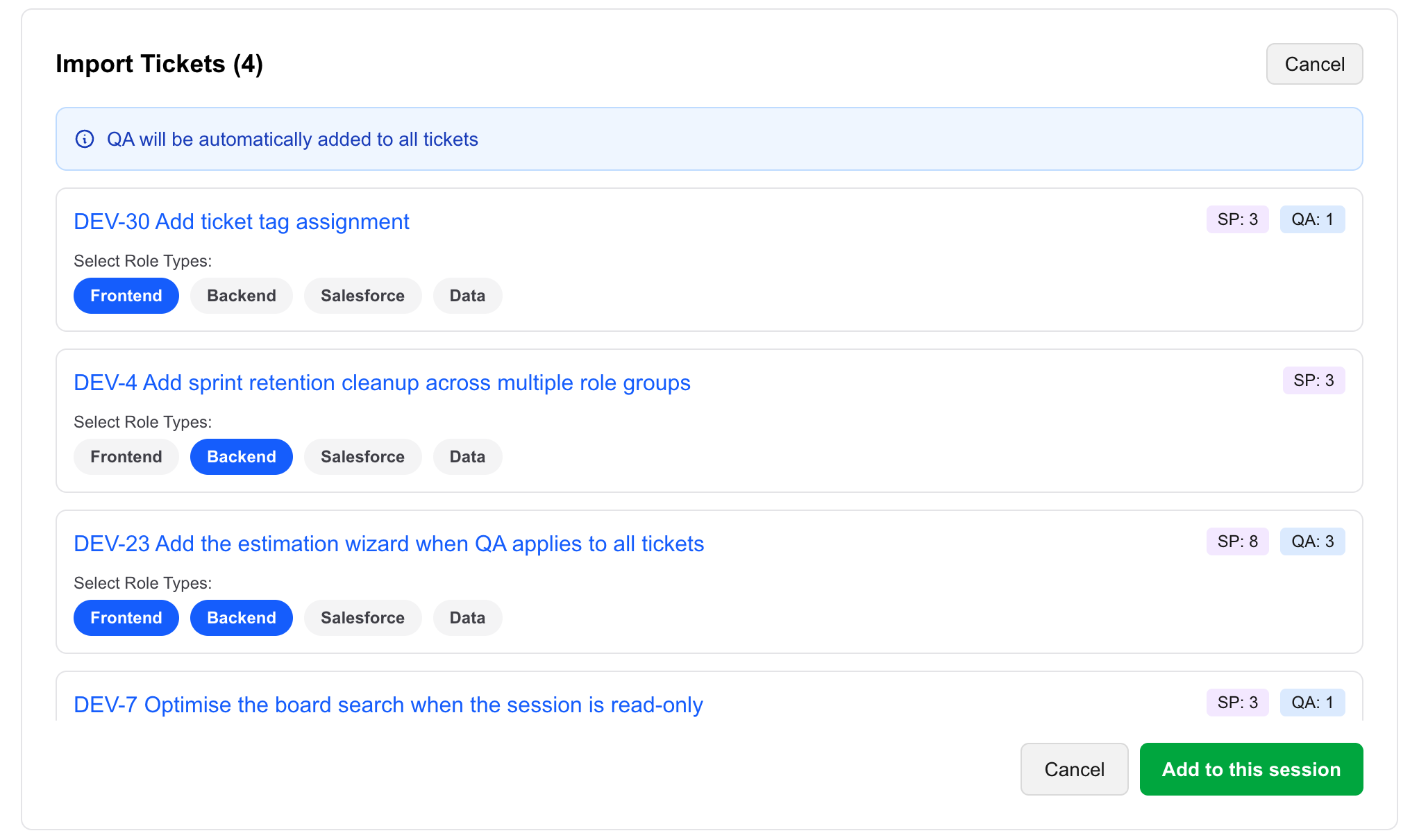
- Choose the people. Pick teammates from the JIRA projects your tickets belong to, or add anyone by email, and give each person one or more roles.
- Share the link and the deadline. Send the session link from the app or your usual channel. The app does not enforce a deadline, so put it in your message.
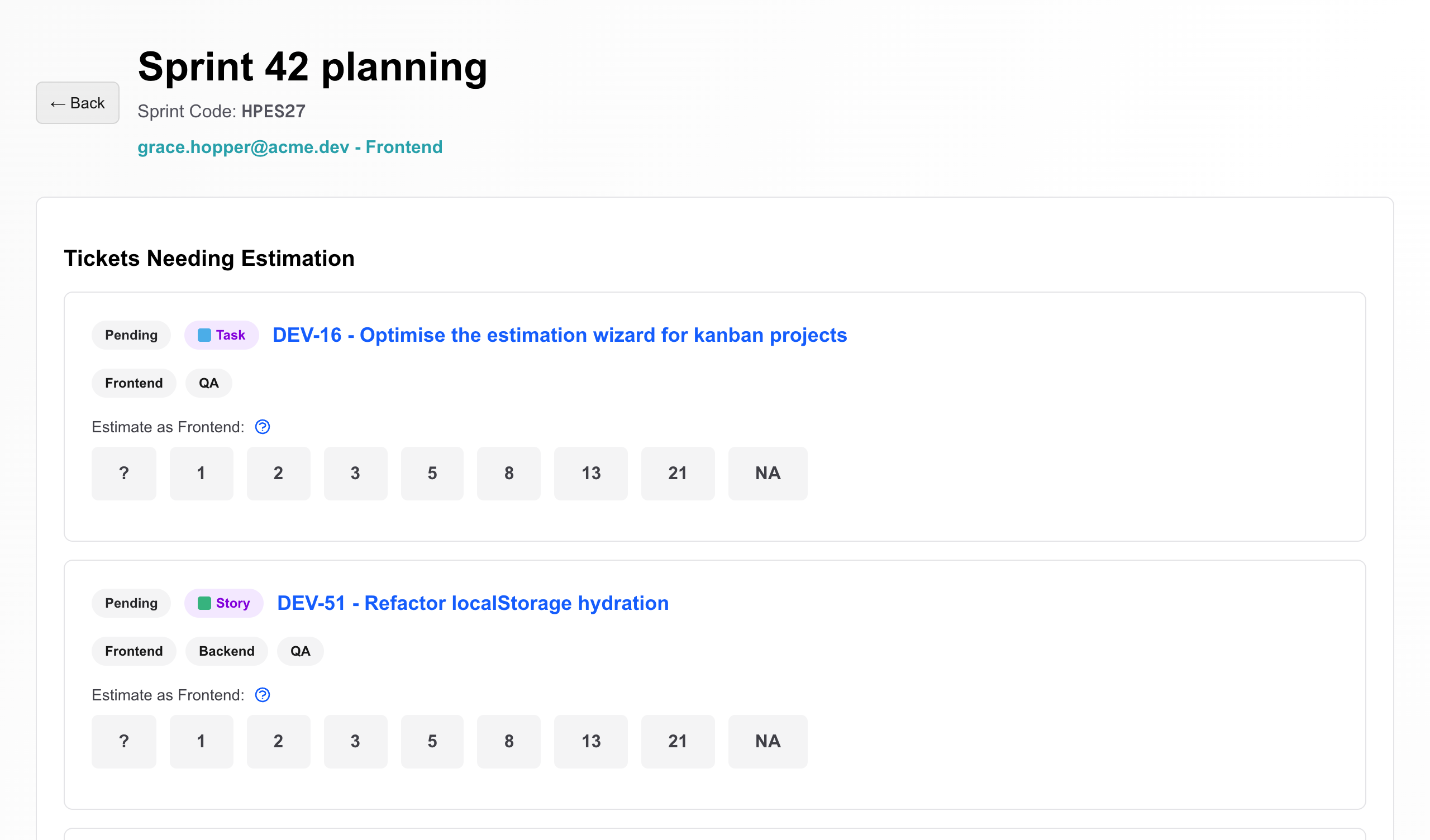
- Everyone estimates on their own time. Each person sees only the tickets tagged for their roles, and the estimation screen shows them only their own answer. “?” flags a ticket for discussion; “NA”, if enabled, marks it as not theirs to size. Research spikes don’t need an estimate at all.
- Agreement settles itself. Agreement is checked per role. When everyone in every role tagged on a ticket has answered and agrees, the ticket is accepted automatically, with a separate value for each role. Disagreements and “?” answers go to review instead.
- Review only what is left. When estimation is complete, the Scrum Master gets an email and sees the review list. They talk through those tickets with the people involved and set the final points for each role.
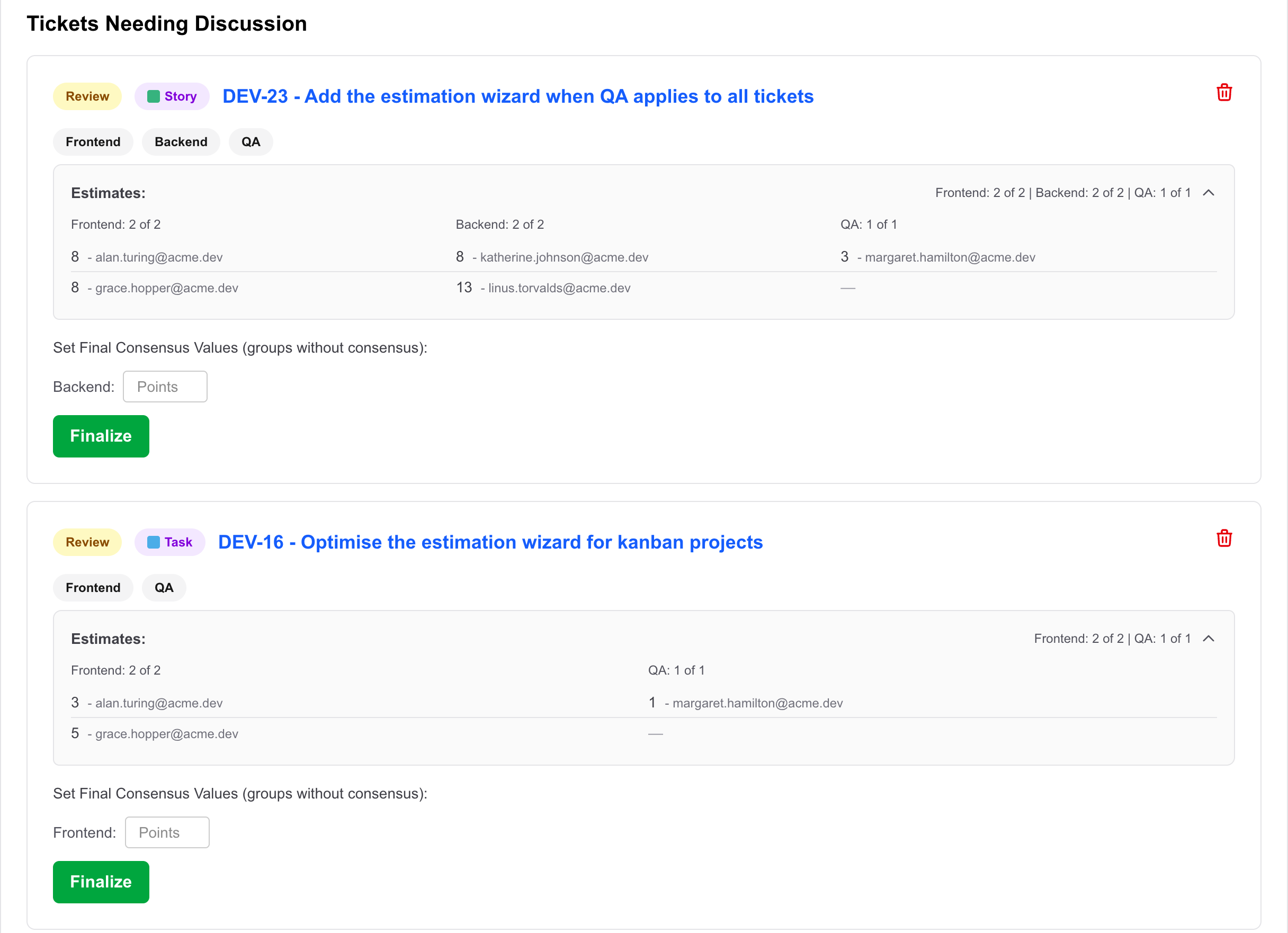
- Record it. Copy the final values into JIRA — the app reads from JIRA but never writes to it.
FAQ
Is asynchronous sprint planning the same as skipping sprint planning?
No. The decisions still happen - what goes into the sprint, how big each item is, and who picks up what. Asynchronous planning moves the estimating and the uncontroversial agreement out of the meeting, so any live time is spent only on the items that genuinely need a conversation.
Will people anchor on each other’s estimates if they are not in the same room?
They can if estimates are visible before everyone has voted. In Async Pointing Poker the estimation screen shows each person only their own estimate, so people size the ticket independently, and the Scrum Master reviews the spread afterwards.
How do you handle a ticket nobody understands?
Give estimators an explicit way to say so rather than forcing a guess. In Async Pointing Poker that is the "?" answer: it stops the ticket from being auto-accepted and puts it on the review list, which becomes the agenda for the follow-up conversation.
What if frontend, backend and QA size the same ticket differently?
That is normal, and averaging them hides useful information. Async Pointing Poker checks agreement per role: a ticket is accepted only when everyone within each role agrees, and it records a separate value for each role, for example Frontend 5, Backend 3, QA 2.
Do the agreed points sync back to JIRA?
No. Async Pointing Poker reads tickets and people from JIRA but does not write to it, so someone copies the final values into JIRA once the review is done. Include that step, and who owns it, in your team policy.
How long should the estimation window be?
Long enough that everyone gets a real working block to look at the tickets - often one to two working days. Shorter windows push people back into rushed guesses; much longer ones let the session drift. Pick a window, write the deadline down, and adjust after a couple of sprints.